 Tieddr Pro Screen
Record your screen on Windows, then edit the take.
Pro Screen combines desktop recording and timeline editing. Choose a display, window, or region, record a short test, then trim the footage and prepare a video to share. Start with the published Windows MSI; a GitHub source ZIP is not an installer.
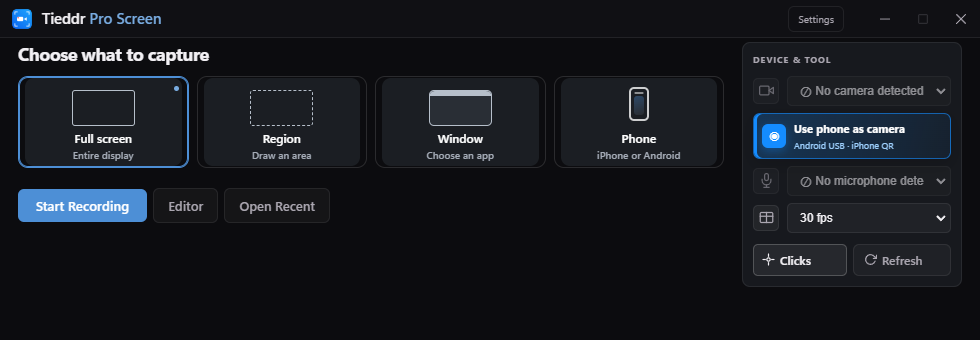
Choose the right capture mode
| What you are showing | Choose | Check first |
|---|---|---|
| A workflow across applications | Full screen | Hide notifications and private windows on that display. |
| One application | Window | Keep the selected window open; test before minimizing or moving it. |
| A specific area | Custom region | Leave room for menus, tooltips, and pointer movement. |
| An Android or iPhone screen | Phone | Connect through the separate phone panel and wait for a live preview. |
Make a first recording
- Open the installed app and select your source.
- Choose the microphone if you need narration. Enable a camera only if you want it in the recording.
- Record about ten seconds, using the same interaction you plan to demonstrate.
- Stop with the recording controls or the shortcut shown in the app.
- Play back the take. Check picture, sound, cursor, and whether private information or recording controls are visible.
Edit before sharing
Use Split and Delete to remove waiting time. Add a zoom where a label needs to be read. Set a background and add a short callout if the viewer needs context. Keep the edits focused on explaining the task.
Save both the project and the export
Ctrl + S saves the editable project. Export creates a separate MP4, WebM, or GIF, depending on your selected settings. Open the saved result in another player before sending it. Keep the project folder together if you want to revisit the edit.
What affects recording quality?
The source resolution is the starting point. A small captured window contains fewer pixels, and zooming magnifies them. A higher export resolution cannot restore missing detail. Use readable source text, moderate zoom, and a short test at your intended output settings.
Installation and availability
The current published Windows installer is unsigned and can trigger security warnings. Review the release information and do not disable browser protections. Website demonstrations use a development build, so compare its controls with your installed version. macOS and Linux installers are not available yet.